Skip to content

An alternative audio engine for Strudel

Play PAM from Strudel.

Strudel is a live coding language that runs in the browser at strudel.cc. Add .pam() to a Strudel pattern and it plays PAM, MAP Audio’s eight-cell sampler and drum synth. Write every note in code, or build the set in PAM and conduct it from a few lines of code.

Three songs, start to finish

Each video shows Strudel’s editor above PAM’s window for a whole song.

Haze GardenPsychedelic hip hop, 86 BPM

PAM makes every sound and plays the tabla from a pattern of its own, while Strudel sends the notes, switches PAM’s variations and stops the record with Vinyl Brake on every cell.

Source on GitHub

Night ShiftTechno, 132 BPM

Strudel plays every note. The PAM preset holds only the sounds.

Source on GitHub

Cold RailTrap, 140 BPM

PAM plays the hats, open hat and rim from its own patterns, in four variations. Strudel plays the kick, clap, 808 and melody, switches the variations and mutes cells.

Source on GitHub

Live browser demo

PAM runs on this page and Strudel plays it from another tab. There is nothing to install.

  1. Choose a song. PAM starts on this page with the song’s sounds.
  2. Open the song in Strudel. A new tab opens at strudel.cc with the song’s code in the editor.
  3. Press play in Strudel and keep its tab in front: Strudel times its notes with page timers, which a browser slows in a hidden tab. The sound comes from this tab. If you hear nothing, click Play in PAM here once, then go back to Strudel.

Two ways to work

Strudel has a sound engine of its own in the browser. PAM is a plugin instrument that the same patterns can play. PAM can also play patterns of its own, so you choose how much of the music is written in code.

Composed live sets

Build the set in PAM. A preset holds each cell’s sound and pattern, in up to eight variations. In Strudel, one line switches variations on PAM’s bar line, and a few more mute cells and turn knobs.

Strudelsongs/trap/cold-rail.strudel.js
$: variation("<4@4  1@8 2@8  3@16  4@4  2@16  3@16  4@4>").pam()
$: knob("mute", "<0@19 1 0@35 1 0@20>").cell("hh").pam()
Free improvisation

Load a preset for its sounds and write every note in Strudel. Each cell is a voice that your patterns play, and each parameter that PAM can map to MIDI is a knob that a pattern can turn.

Strudelsongs/techno/night-shift.strudel.js
const bd = s("bd*4").velocity("1 .88 .94 .88")
const hh = s("hh*16").velocity("[.55 .22 .7 .22]*4")
  .knob("synth_p2", "<.2!3 [.2 .2 .2 .34]>")

You can also split the work. In Cold Rail, PAM plays the hats from its own patterns while Strudel plays the kick, the 808 and the melody.

What PAM brings

Eight cells
Each cell has a sampler and a drum synth with 22 engines.
34 effects in every cell
Filters, EQ and compression, delays, resonators, pitch shifting and character effects.
A sequencer in every cell
PAM can play some parts from its own patterns while Strudel plays the others.
Eight variations
A preset holds eight variations of its patterns and settings. PAM switches between them on the bar.
An eight-track looper
press() records, arms, mutes and clears looper tracks from a pattern.
Plugin or standalone
PAM runs in your DAW as VST3, AU or CLAP, or by itself as an app.

What the code looks like

The patterns are ordinary Strudel. The package adds one output, .pam(), and a few functions that put PAM’s controls in a pattern.

  • Play cells

    s() plays a cell by number, or by a name that you give it in pamsetup(). note() plays a cell by pitch.

    StrudelREADME.md
    $: s("1*4, ~ 2, 3*8").pam()             // cells 1-3 as a drum kit
    $: note("c2 [eb2 g2]").cell(5).pam()    // cell 5 by pitch
    $: s("bd*4").pam()
  • Turn knobs

    knob() sets a parameter in its own unit: Hz, dB, % or semitones. The value can be a list of steps or a signal such as a sine or a saw.

    StrudelREADME.md
    knob("filterCutoff", "<300 1200 8000>").cell(3)
    knob("cell3_delayMix", 40)
    knob("macro_filterCutoff", saw.range(200, 12000).slow(8).segment(32))
  • Switch variations

    variation() chooses one of the eight variations of a PAM preset. PAM makes the switch on its next bar line.

    StrudelREADME.md
    $: variation("<5@4 1@8 2@4 3@8 1@8 2@4 3@8 4@8 3@16 5@4>").pam()
    $: knob("mute", "<0@4 1@4 0@64>").cell("snare").pam()
  • Share a clock

    pamclock() sends MIDI clock. A standalone PAM with External Clock Sync on starts when Strudel starts and follows Strudel’s tempo.

    Strudelsongs/trap/cold-rail.strudel.js
    $: pamclock().pam()

The README has the rest: press() for buttons such as mute, solo and looper record, pamtheme() for PAM’s colours in the editor, and mapuzu render, which renders a song file to WAV and MP3 with mapcli, PAM’s command-line engine. Rendering needs a PAM licence or trial.

Set it up

You need PAM, a virtual MIDI port and a browser with Web MIDI.

  1. Open PAM and load a preset

    Use the standalone app or the plugin in your DAW. The free trial works too.

    Download PAM
  2. Give PAM a MIDI port

    Make a virtual port that the browser sends to and PAM listens on: the IAC Driver on macOS, loopMIDI on Windows or snd-virmidi on Linux. Standalone PAM chooses its MIDI input in Settings. In a DAW, PAM takes it from a MIDI track.

  3. Paste three lines into Strudel

    Put these lines at the top of your code on strudel.cc and run the code. The browser asks once for MIDI access. The last line plays cells 1 to 3 as a drum kit.

    Strudel
    await import('https://map.audio/mapuzu.mjs')
    await pamsetup()
    
    $: s("1*4, ~ 2, 3*8").pam()

    Notes and variation switches work straight away. Pass pamsetup() the MIDI port, channels and cell names that your preset needs.

  4. Import the mapping file for knobs

    Knobs, mutes and solos go through a MIDI mapping that PAM imports once. Run npx @mapaudio/mapuzu midimap --all --out pam.midimap.json, then choose the file in PAM under Settings > Mappings > Import. The import replaces PAM’s list of mappings, and the --merge option keeps what you had.

Good to know

  • Knob values are sent as 7-bit MIDI, so a knob lands on one of 128 positions in its range.
  • Each message is sent with a Web MIDI timestamp. Three things are not sample-accurate: PAM applies a mapped parameter on a timer tick, a variation lands on a bar line, and mute and solo go through PAM’s editor.
  • An effect’s knobs do nothing until that effect is switched on in the preset.
  • Some hosts, Ableton Live among them, send every MIDI channel to a plugin as channel 1. In those hosts, play only one cell by pitch, or use standalone PAM.
Get the package on GitHub

The source, the full reference and the example songs are in the repository.

TidalCycles too

The same package makes PAM an OSC target in TidalCycles. Load mapaudio.tidal in your boot file and run mapuzu tidal, which turns Tidal’s OSC messages into the MIDI that PAM plays. Most of the functions keep their names, written in Tidal’s syntax.

TidalCycles setup in the README
TidalCyclesREADME.md
d1 $ pam "1*4, ~ 2, 3*8"
d2 $ note "c3 [ef3 g3]" # cell "5"
d3 $ variation "<1 1 2 3>/4"
d4 $ knob "mute" "<0 1>/4" # cell "3"
d5 $ pamclock
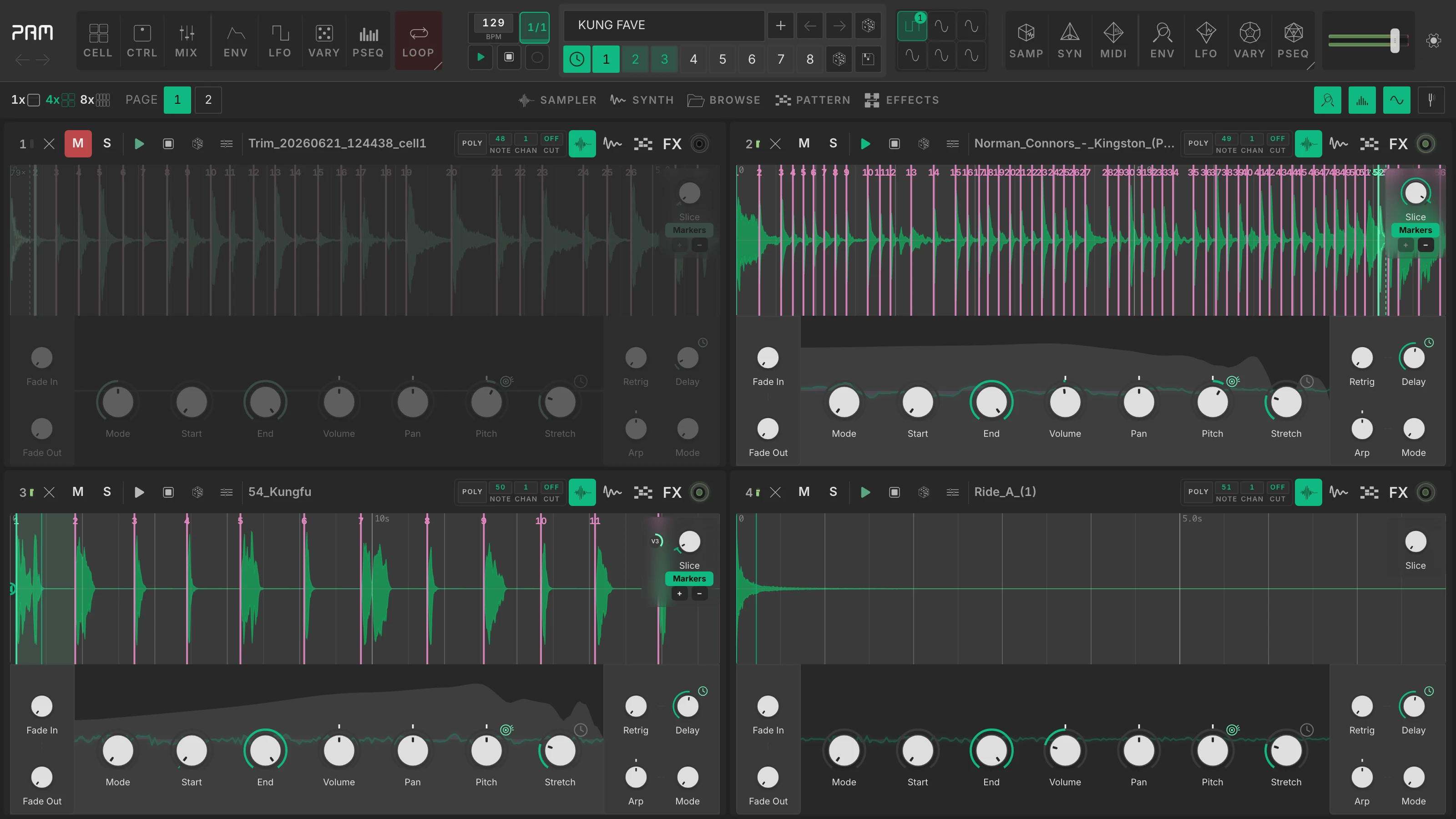
PAM in four-cell view with samples and pattern sequencers

This is PAM

Eight sampler and drum-synth cells with 34 effects per cell, a modulation matrix, pattern sequencers, a tracker, and an eight-track looper.

  • 8-cell sampler + 22-engine drum synth
  • 34 built-in effects in every cell
  • Modulation matrix: LFOs, envelopes, Vary, and ParamSeq
  • Pattern sequencers, piano roll, and 8-cell tracker
  • 8-track looper with variations
  • AI agent control over MCP (Claude, Cursor, Codex)

Excl. tax

About the package

Licence
The package is free software under AGPL-3.0-or-later. Its source is at github.com/MAP-Audio/mapuzu, and forks are welcome.
Problems
Problems and feature requests go to MAP Audio’s Discord, not to Strudel or TidalCycles.